How Does the Automatic Photo Booth Achieve Automatic Photo Printing?
When traveling, we often see that roller coasters and other amusement facilities have automatic photo services, and after taking photos, we can obtain photos of our experiences. With the of automatic photo equipment in tourist attractions, photo printing has also become a daily problem faced by scenic area photography service operators. Most scenic areas prioritize quickly allowing tourists to see their photos and save labor costs, so automatic photo printing has become a primary need for large scenic area photography services. Many owners don't know where to find software that can automatically create templates and automatically print photos. Today, let's introduce HappyPrint Scenic Image Printing Management Software to see how it achieves automatic printing.
It's very simple to implement automatic template creation and automatic printing within this software
First, install the HappyPrint Printing Management Software
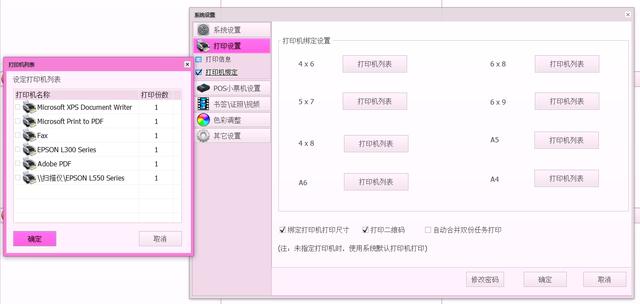
Second, in System Management--Printing Management, bind the printers you are using, supporting up to 20 printers simultaneously
Third, place the photo templates you need in the template folder
Fourth, in System Management--Automatic Processing, check 'Automatic Printing' and 'Automatic Template Creation'
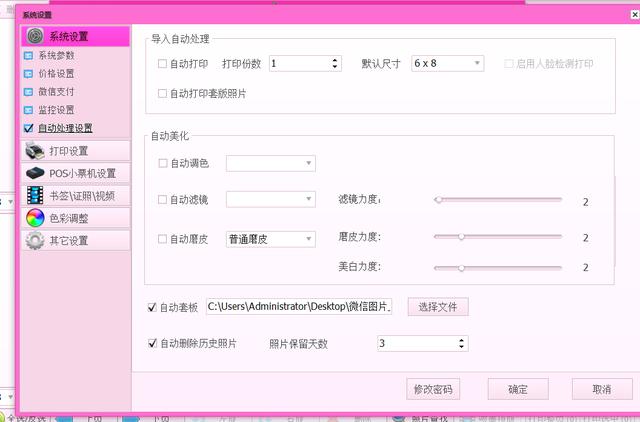
Once these settings are complete, the system automatically creates templates and prints photos from the automatic photo system – isn't that simple!